Case Study / Exploring an AI Design-to-Code Workflow
Qilin — Exploring the Claude Design × Claude Code Loop
A solo exploration of how Claude Design and Claude Code actually talk to each other — building a fintech demo app, stocks and crypto in one portfolio, with no Figma and no engineer in the loop.

Not "can AI design a screen" — that question is already answered. The real question is: how well do two separate AI tools, one for design and one for code, actually communicate when you ask them to carry a product from a blank page to a working prototype?
The Shift
Every AI design tool so far has answered the same narrow question: can it generate a nice-looking screen? That question is largely settled. What's far less tested is what happens at the seam — the handoff between a design tool and a coding tool, built by the same company, still having to pass context to each other the way a designer and an engineer would.
So I ran the experiment on myself: one product, two AI tools — Claude Design and Claude Code — and me in the middle, directing both and watching where the handoff held, and where it broke.
The Challenge
Build a working fintech demo app (Qilin, a stock + crypto portfolio simulator) using only Claude Design and Claude Code, with no Figma file and no engineer involved at any point. The real goal wasn't the app itself: it was measuring, honestly, how far this workflow can carry a product designer working alone.
The loop, in practice:
- 1. I brief Claude on intent and constraints.
- 2. Claude drafts the actual prompts to send to Claude Design or Claude Code.
- 3. I review and edit every prompt before it's sent — nothing goes out unchecked.
- 4. Claude Design generates the design system and an interactive prototype.
- 5. Claude Code brings it to life as a real, working app.
From directing pixels to directing prompts — and reviewing every one of them.
My Role
Solo — Product Designer, Direction & QA
I led every part of this end to end: framing the product, briefing and correcting two AI tools, and catching the details neither of them would catch on its own.
My role covered:
- check_circleproduct framing
- check_circleprompt direction & review
- check_circleUX & interaction QA
- check_circlevisual design critique
- check_circledesign system direction
- check_circletechnical troubleshooting
No engineer, no other designer — every decision, correction, and course change in this case study came from a single person directing two AI tools in real time, and being honest about where they fell short.
The Demo Product
Qilin is a demo investment app that unifies stocks and crypto into a single portfolio. The name comes from the qilin, a mythical creature from Chinese folklore associated with prosperity and good fortune — a fitting namesake for a portfolio tool, and a light thematic thread running through the product's visual identity.
Three core screens — Wallet, Markets, and Detail — with real buy/sell flows, starting from a simulated $10,000 balance.
Beyond the core flows, I added a layer of product opinion that wasn't strictly necessary to prove the technical thesis, but proved a product one: an AI insights chat present on every screen, a "next big events" widget surfacing macro catalysts, and a sentiment gauge per asset.
Try the live demo arrow_outwardGenerating the Design System
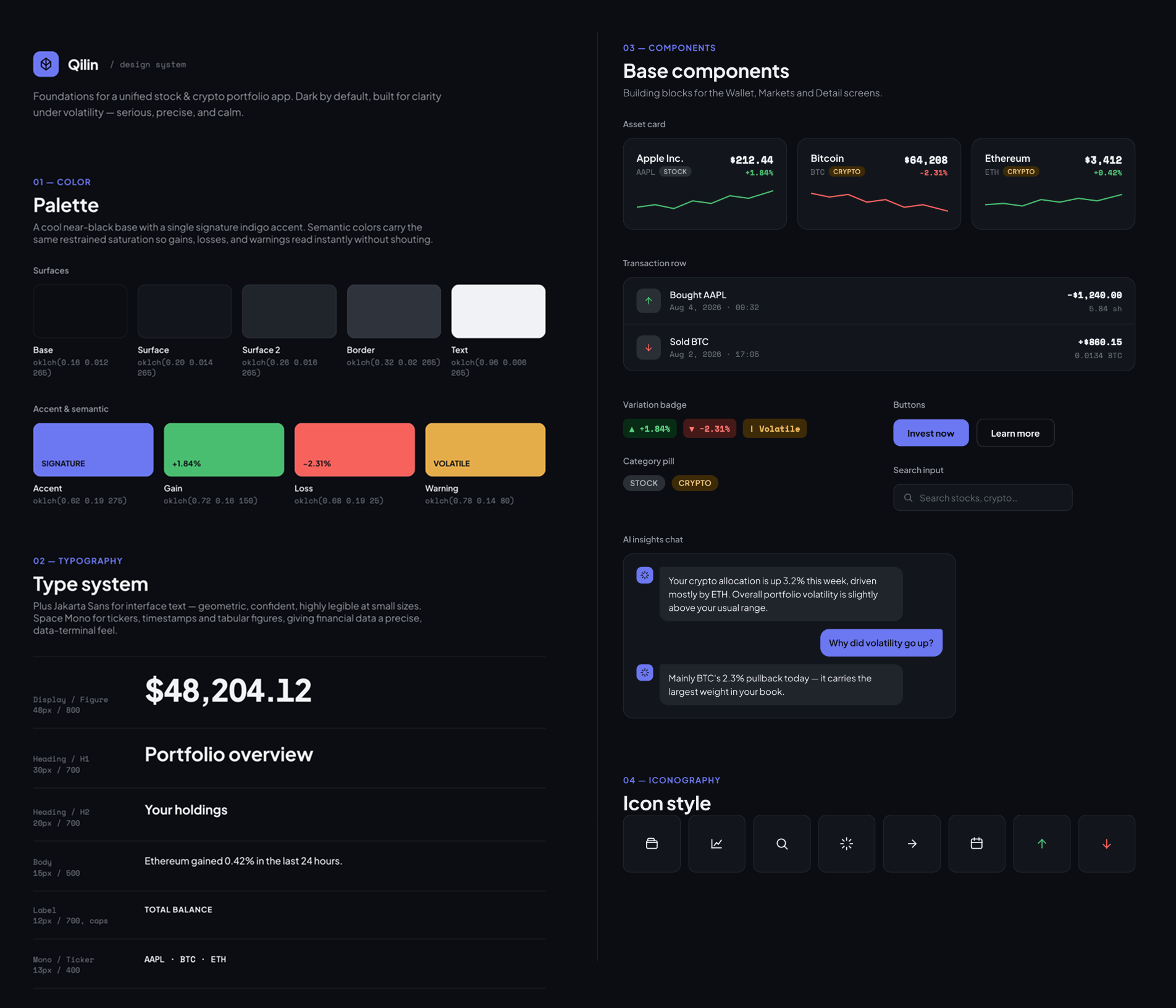
A solid first pass — dark indigo, clean, coherent — good enough to build the rest of the week on.
What worked
Because Claude Design had the context that this was an investment app, it proactively introduced fintech-standard components — asset cards, transaction rows — without being asked.
To improve
Clean, but generic — a design system with little personality of its own. Something to revisit later in the process.
Generating the Screens with Claude Design
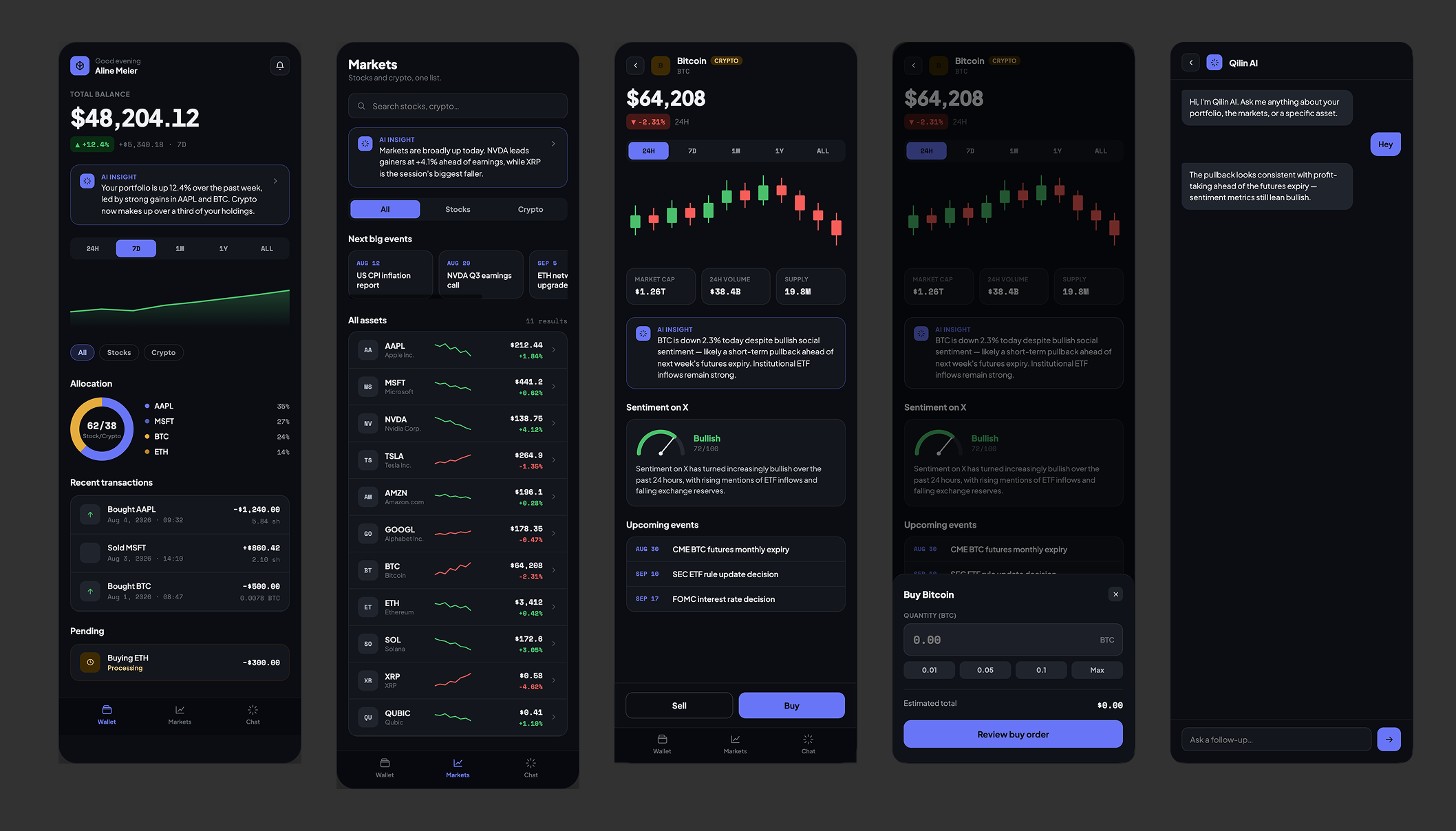
Without being told to, Claude Design chose to design a mobile app — a non-trivial, correct product call for a consumer fintech tool. It also designed a fair amount on its own: filters, chart period switches, percentage variation displays, buy/sell amount shortcuts, and several default interactions.
What worked
Autonomous, sensible product decisions — mobile-first framing, trading-pattern shortcuts — pulled from domain conventions without prompting.
To improve
The candlestick chart wasn't usable, the page didn't scroll (everything stacked on one long canvas), and screens had no links between them.
Worth being precise about: the AI chat, the "Sentiment on X" gauge, and the "Next big events" widget were not Claude Design's ideas — they were mine, specified upfront in the brief. Claude Design executed them well, but it didn't invent them. This is exactly where a designer's value sits in this workflow: not in drawing the screen, but in deciding what deserves to be on it in the first place.
Transition to Claude Code
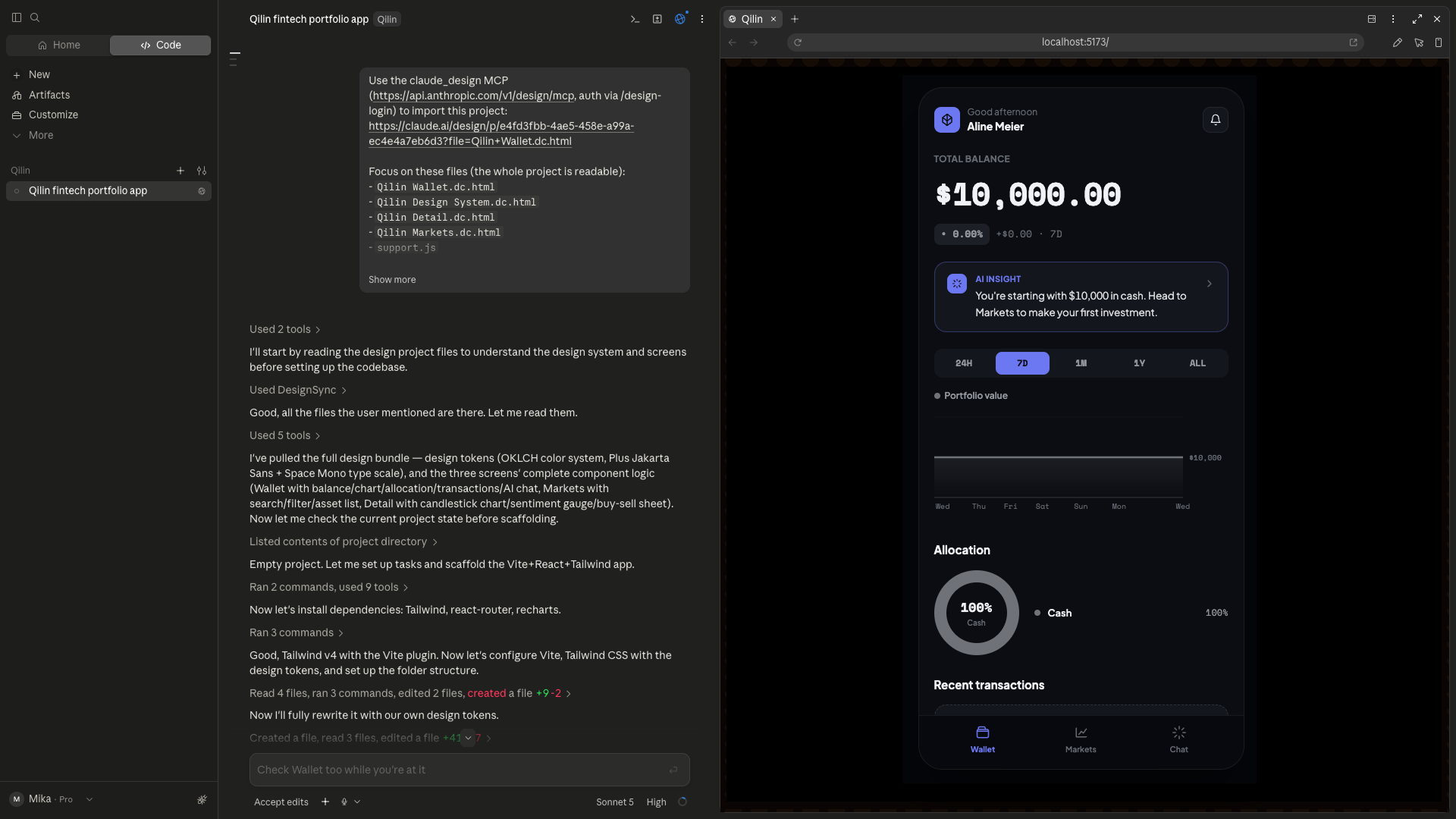
Importing the Claude Design bundle worked cleanly, and the project jumped a level of reality: real market data via live APIs, and transactions that actually persist rather than just look interactive.
Watching Claude test its own work live, in an embedded browser, was the most striking part of the whole week.
It reasoned from the code, but also from what it actually saw on screen — finding and fixing real bugs on its own, and handling unhappy paths (invalid trades, insufficient funds) without ever being asked to.
Iteration in Claude Code
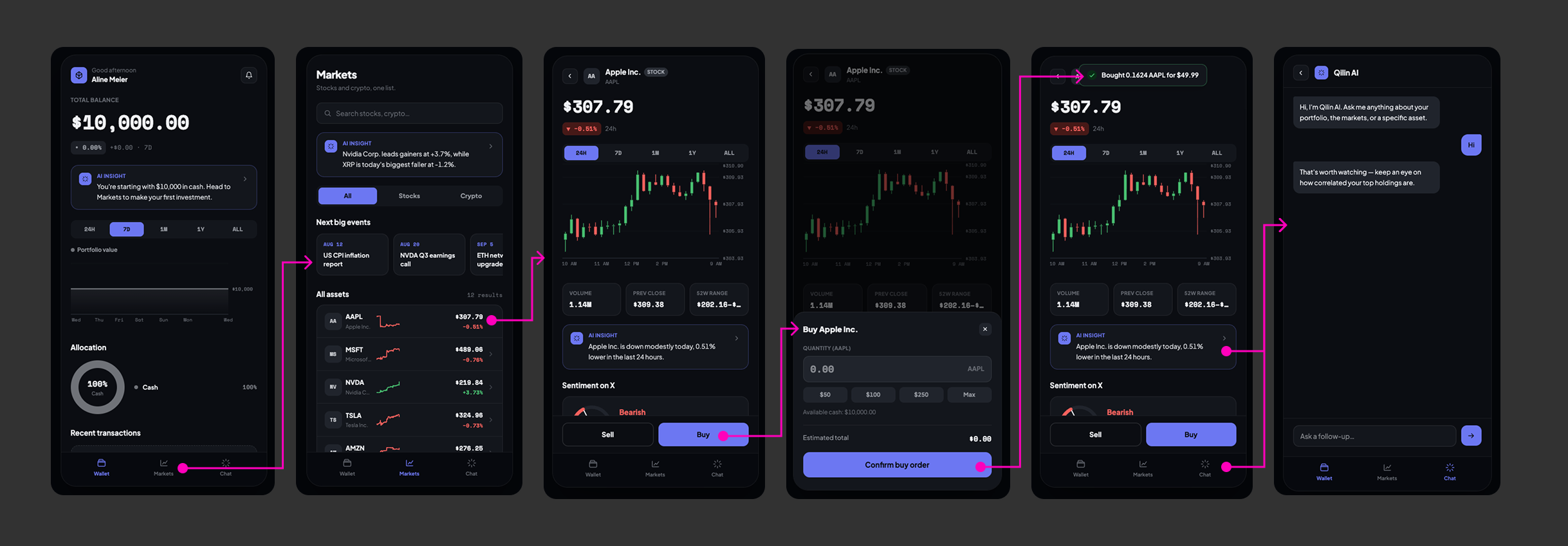
This is where the work stopped being one-shot generation and became real direction. We fixed the scroll behavior ourselves, rebuilt the candlestick chart to be genuinely readable, and reworked the Wallet's evolution chart. We iterated on the AI chat until the interaction actually made sense — and until it was shared consistently across all three screens.
This is where directing an AI stops being passive: catching what's off, and pushing until it's actually fixed.
It took time, but everything got resolved. One overcorrection worth noting: an unscoped "check responsiveness" request got pushed all the way down to 320px-wide screens — a resolution barely used today — burning real time and tokens on a low-value edge case.
Updating the Design System in Claude Design
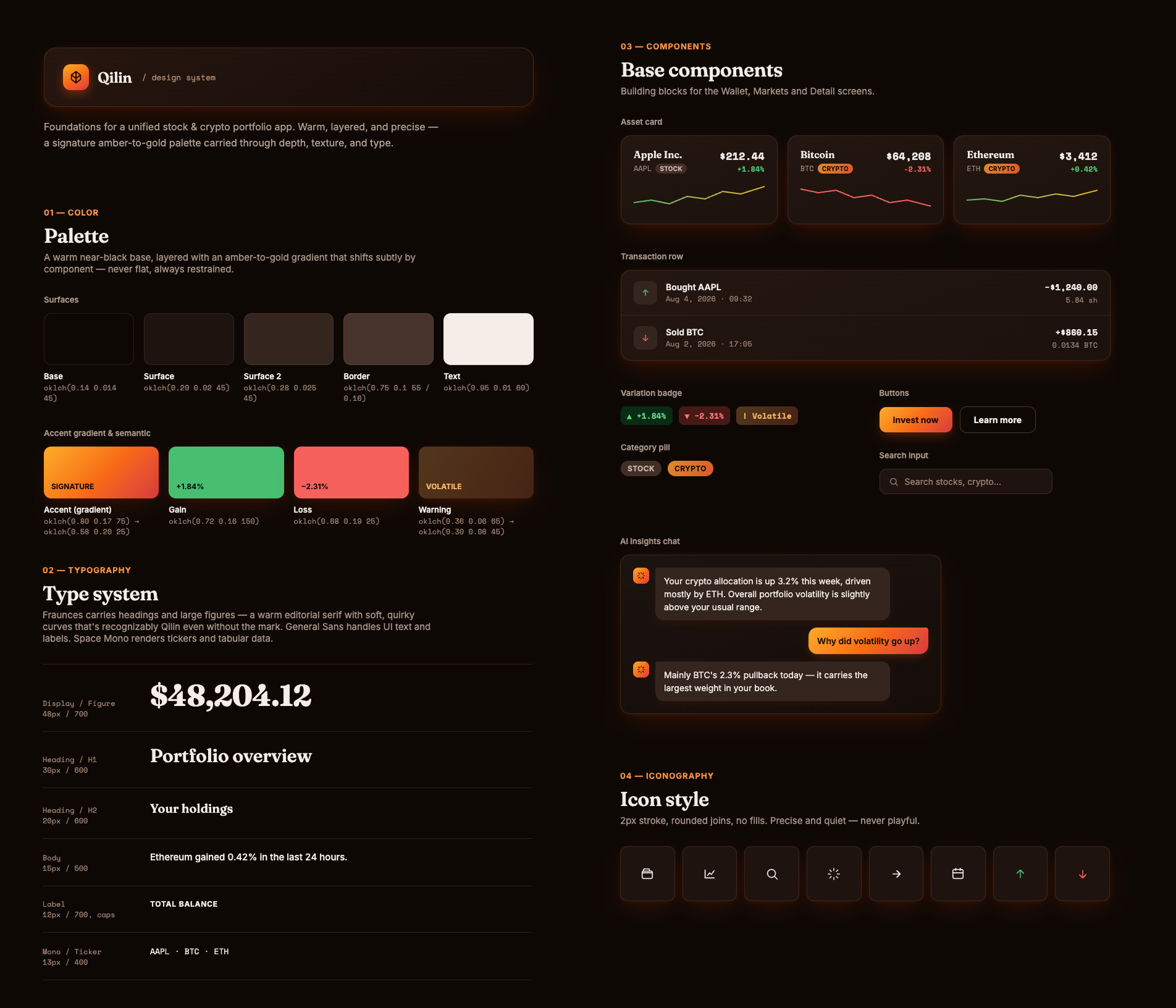
We pushed for more personality — a warmer "Sunrise" direction: gradients, shadows, glass surfaces, a subtle scale-pattern texture inspired by the Qilin itself. Claude Design did what it could with the brief — a real step up, but not as polished as a senior UI designer would have delivered by hand.
This is exactly where a UI designer still earns their keep — not managing an entire design system, but focusing on the few visually critical elements and making sure they're implemented well. The role evolves; it doesn't disappear.
Reflecting the Change in Claude Code
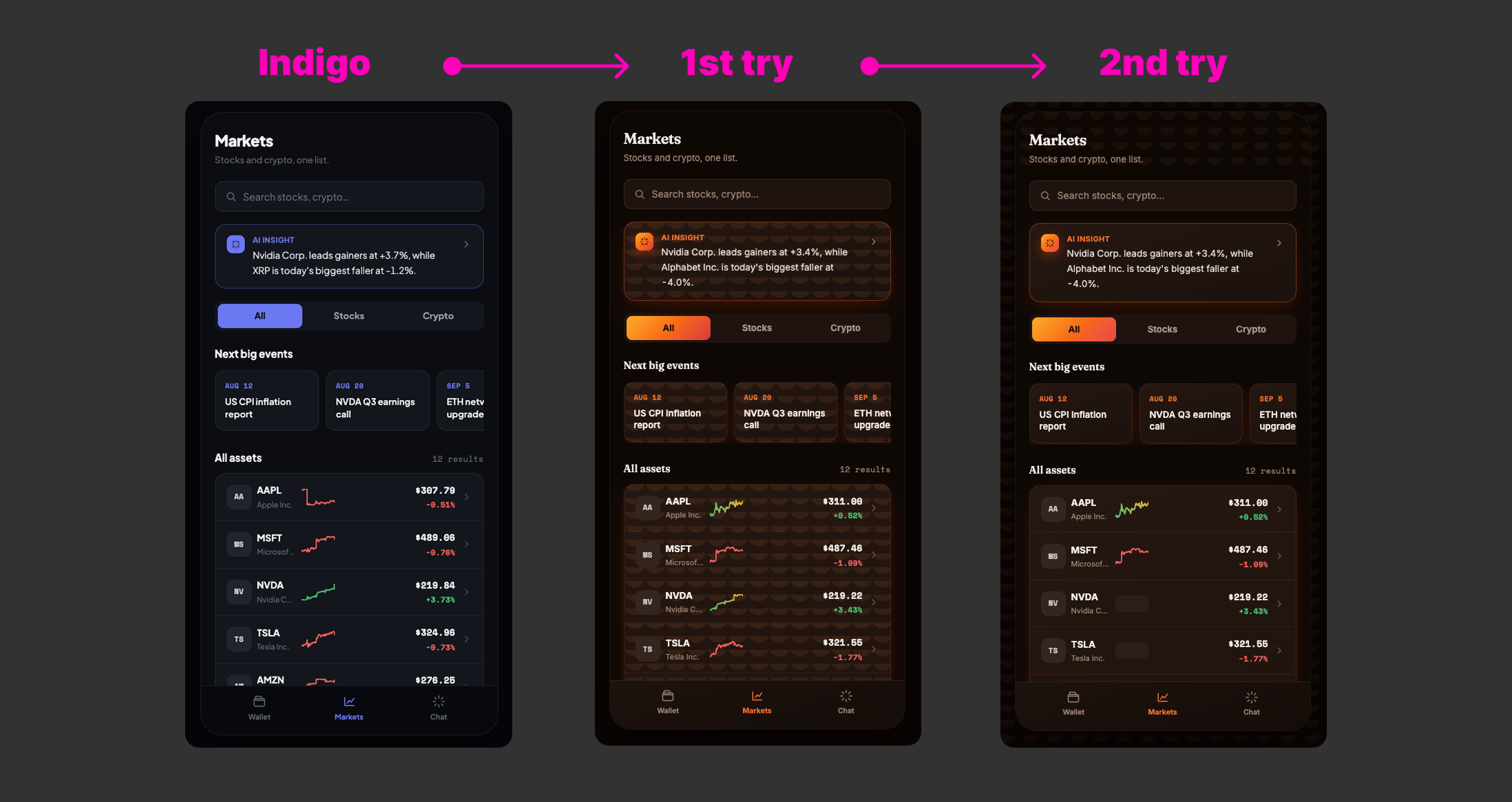
The promised "magic" of the /design-sync command didn't work as advertised. It turned out to be built for extracting a reusable component library from a repository with its own Storybook and build step — not for pulling a style update into a self-contained consumer app like Qilin, where components are wired directly into business logic.
What actually worked: a simple, more detailed prompt asking Claude Code to pull the updated tokens directly from the Claude Design project — no special command required, just one extra round of iteration to get it fully right.
Reflection
After this exercise, I think the human's value is still very much present.
The Product Designer (or PM) brings the ideas — the features nobody asked the AI for — refines the interactions, and has the eye for spotting what's off and correcting it.
The UI Designer brings personality to the handful of elements that actually carry it, not to dozens of components and variants. In practice: let AI generate the basic bricks, rework the critical ones by hand, then re-inject them into Claude Code.
With a design system living in Claude Code, a Product Designer or PM generating screens gets output that follows the design system's rules, in code that's as close to production-ready as possible. The wall between product, design, and engineering stops being a wall — everyone works in the same place, on the same code, just with different roles and responsibilities.